Master the Built-In Desmos Calculator: Free Points Hiding in the SAT Math Section
Every student taking the digital SAT has the same powerful tool sitting one click away in the Math section — and many barely touch it. The built-in Desmos graphing calculator can turn questions that look like a page of algebra into a few taps. Here's what College Board actually provides, how to use it well, and the one mistake that quietly costs points.
What College Board actually gives you
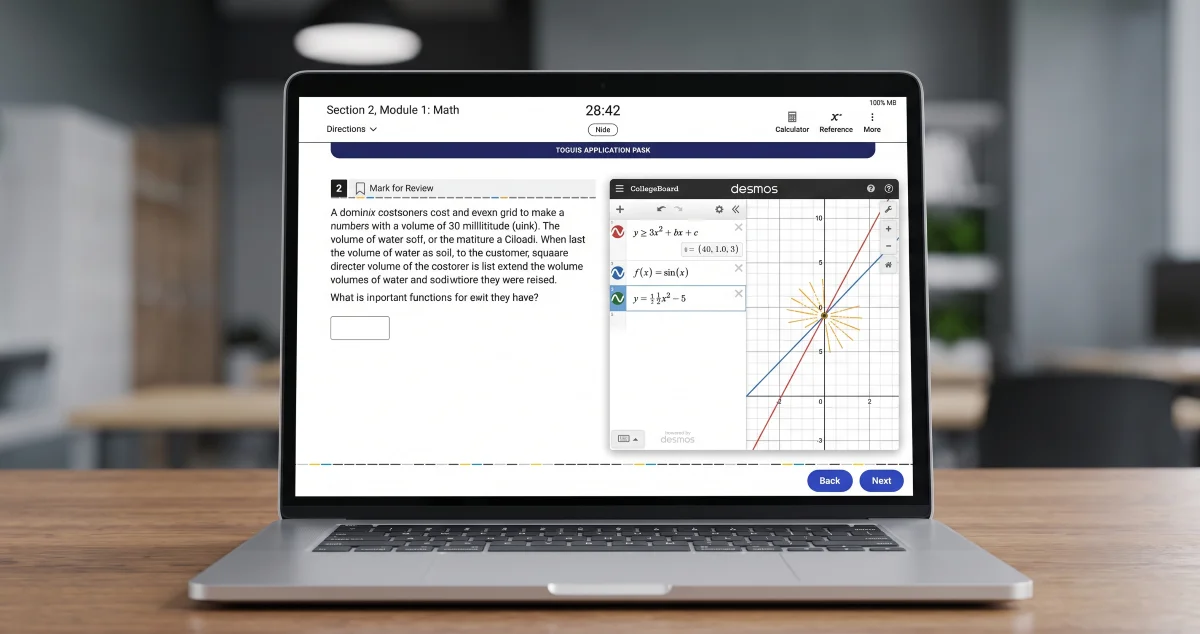
Per College Board's calculator policy: "Bluebook contains an embedded Desmos calculator with two options—graphing or scientific." You don't have to choose between tools, either — "You may use your own approved handheld calculator or take advantage of the Desmos calculator embedded in Bluebook." The embedded calculator is available for the entire Math section, and you can "drag it anywhere on the screen."
The two modes matter. Scientific mode handles straightforward arithmetic; graphing mode is where the real time savings live. You can switch between them at any point in the Math section — which leads directly to the one trap below.
The trap: content doesn't carry between modes
Here's the mistake even strong students make: whatever you type into one mode does not appear in the other. If you enter an equation in graphing mode and then toggle to scientific, your work doesn't follow. Always confirm you're in the mode you intend before you start typing, or you'll waste seconds re-entering — and seconds matter when each Math module is tightly timed.
Moves worth practicing
The graphing calculator's strength is that it shows you answers you'd otherwise solve by hand. A few capabilities worth drilling until they're reflexive:
- Solve systems by graphing. Type both equations; the point where the lines or curves cross is the solution. Reading an intersection is often faster and less error-prone than substitution or elimination.
- Find roots and intercepts. Graph an expression and the points where it crosses the x-axis are its solutions; where it crosses the y-axis is the constant term in action.
- Read a parabola directly. Graph a quadratic and the calculator marks its key points — you can read the vertex and roots off the graph instead of recalling formulas.
- Use it to check, not just solve. Even when you do the algebra by hand, a quick graph confirms your answer before you move on.
The point isn't to graph everything — it's to recognize the question types where graphing beats algebra, and to be fast at them.
Build the skill the right way
College Board's own advice is blunt: "If you're not familiar with the Desmos calculator options that are embedded in the digital test, take some time to learn how to use them." The closer your practice tool is to the real thing, the better — so practice inside Bluebook's Math section, or on the official Desmos test calculator, until the moves feel automatic. Discovering the calculator for the first time on test day is the most expensive way to learn it.
Quick tips
- Pick your mode first. Confirm graphing vs. scientific before typing — content won't carry over.
- Default to graphing for systems and quadratics; default to scientific for plain arithmetic.
- Drag it out of the way so it doesn't cover the question while you read.
- Use it to verify, even on questions you solve by hand.
- Practice it where it counts — inside Bluebook or on the official Desmos calculator, not a random app.
Keep going with ExamNexus AI
Knowing the calculator is half the battle; knowing which Math skills are actually costing you is the other half. Run a practice set on ExamNexus AI and your performance analysis flags the exact question types where you're losing points — including the ones a graphing move could rescue — and your study roadmap turns them into a focused, week-by-week plan timed to your test date. Pair the free Desmos tool with targeted practice, and watch the Math section get shorter. Start your next practice session today.
Sources
- https://satsuite.collegeboard.org/sat/what-to-bring-do/calculator-policy
- https://bluebook.collegeboard.org/students/tools
- https://www.desmos.com/testing/cb-sat-ap/graphing